Fall 2 Reporting
(Updated 9/4/2026)
This primer will provide you the necessary tools in navigating through the CALPADS system and the different Fall 2 reporting requirements for which you are expected to comply with. This page will continually be updated with new content as needed.
Additional guidance is also available in the CALPADS FAQ site.
CALPADS Submission and Certification Deadlines
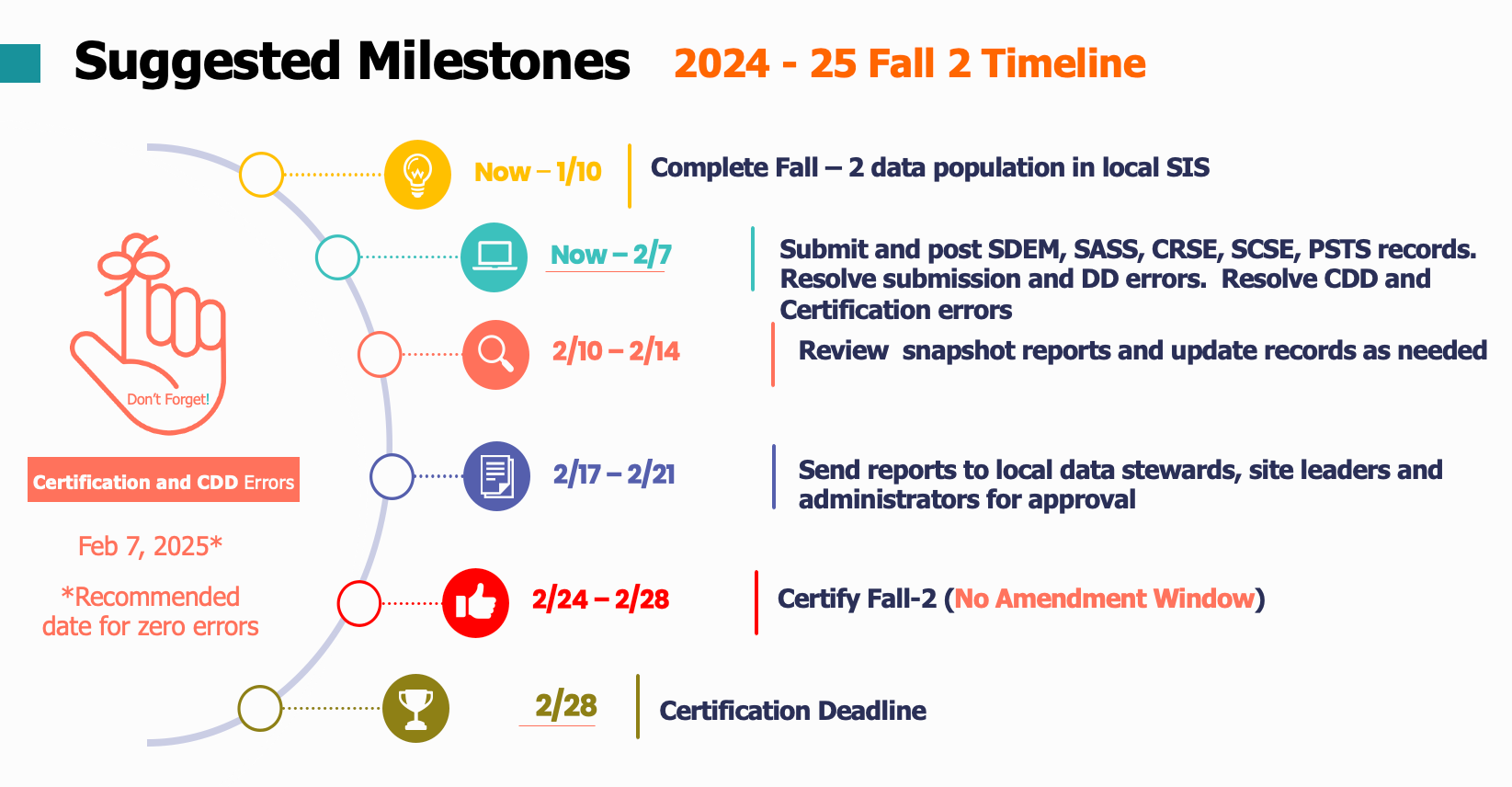
The table below list the official dates and milestones associated to the different CALPADS submission periods. The Official Submission window reflects when the CALPADS snapshot revisions are activated and NOT the start of data submission. Submission of required files can be done anytime and as early as now.
| 2026–27 CALPADS Submission | Primary Data Submitted | Official Submission Window | Recommended Date for Zero Errors | Certification Deadline | Amendment Window Deadline (Amendment Window Closes) |
|---|---|---|---|---|---|
| 2026–27 Fall 1 | 2026–27 (Census Day): - Enrollment counts - English language acquisition status - Unduplicated Pupil Count - Free/reduced-price meal-eligibility - Special Education 2025–26: - Dropouts |
October 7, 2026 (Census Day) to January 22, 2027 |
November 20, 2026 | December 11, 2026** Special Education Local Plan Area (SELPA) approval strongly encouraged, but not required |
January 22, 2027 Special Education Local Plan Area (SELPA) approval required |
| 2026–27 Fall 2 | - Student Course Enrollments - Staff Assignments and full-time equivalent (FTE) - English Learner Education Services - Postsecondary Outcomes for prior year graduates who were Career Technical Education (CTE) Completers |
October 7, 2026 (Census Day) to February 26, 2027 |
February 5, 2027 | February 26, 2027 | No Amendment Window |
| 2026–27 End-of-Year (EOY) 1 | - Program Eligibility/Participation - Student Incidents - Cumulative Enrollment - Student Absence Summary and Attendance Recovery Days - Count of English Learner (EL) Reclassified during School Year - Homeless Students - Immigrant count - Special Education - Postsecondary Outcomes for Students with Disabilities (SWD) Prior Year Completers - Expanded Learning Programs |
May 4, 2027 to July 30, 2027 |
June 25, 2027 | July 16, 2027 SELPA approval strongly encouraged, but not required |
July 30, 2027 SELPA approval required |
| 2026–27 EOY 2 | - Course Completion for Grades 7–12 - Career Technical Education (CTE) Participants, Completers - Work-Based Learning Indicators - One-Year Graduate and Completer Counts |
May 4, 2027 to Monday, August 16, 2027 |
July 23, 2027 | August 16, 2027* | No Amendment Window |
Fall 2 Submission Checklist
This form provides detailed list of data requirements and key responsibilities to facilitate the smooth Fall 2 submission and certification experience of LEAs. It contains multiple tabs that includes the checklist and list of certification reports. LEAs may download the spreadsheet, assign staff responsibilities and send it to the field.
Download Checklist
(Updated 9/3/2026)
CALPADS Documentation
CALPADS Update Flash #329 (Dated 12-Aug-2026)
Topics Include: Topic: 2026–27 School Rollover and Changes Coming Later in School Year.
CALPADS Update Flash #326 (Dated 07-Jul-2026)
Topic: 2026–27 Updates to Job Classification Codes and Course Section File Impacting Fall 2 Data Submission.
CALPADS Fall 2 FAQ
List of frequently asked questions for CALPADS Fall 2 submission.
Fall 2 Changes
| Functionality | Change |
|---|---|
| Code Set | RETIRED – Educational Service Job Classification codes • 12 – Teacher • 25 – Non-certificated Administrator • 26 – Charter School Non-certificated Teacher • 27 – Itinerant or Pull-Out/Push-In Teacher |
| NEW – Educational Service Job Classification • 13 – Teacher, Instructional Assignments • 14 – Teacher, Non-Instructional Assignments CRSE/C Indicators (Y/N): • Itinerant Teacher • Pull-Out/Push-in Teacher |
|
| File Type | MODIFIED – Fall-2 • CRSE/C – 2 new fields • Itinerant Teacher • Pull-Out/Push-in Teacher |
| Code Set | RETIRED – Course Group State codes • 9662–9667 – old Cambridge Course codes |
| NEW – Course Group State codes • Cambridge Courses: • 9704 – Cambridge Advanced History (US to 1877) (AS Level) 8101 • 9705 – Cambridge Advanced History (European) (AS Level) 9981 • 9706 – Cambridge Advanced History (International) (AS Level) 9982 • 9707 – Cambridge Advanced History (US since 1877) (AS Level) 8102 • 9708 – Cambridge Advanced European History (A Level) 9981 • 9709 – Cambridge Advanced International History (A Level) 9982 • Advanced Placement Courses: • 9363 – Advanced Placement (AP) Networking • 9364 – Advanced Placement (AP) Cybersecurity • 9365 – Advanced Placement (AP) Business with Personal Finance • Other Course: • 9710 – Personal Finance |
|
| Input Validations | RETIRED – • CERT052 – Itinerant or Pull-Out/Push-In Teacher Staff Assignment Missing This Certification Validation Rule (CVR) is no longer needed because Itinerant or Pull-Out/Push-In teachers are no longer reported as Job Classifications on the SASS. • SASS0257F2 – Invalid Assignment Code for Employee on Leave This validation is no longer needed because all Job Classification codes except 13 – Teacher, Instructional Assignment are prohibited from submitting 6018 – Employee on Leave. • SASS0582F2 – SEID Cannot Have Simultaneous Records with Job Classifications of 10 and 25 This validation is no longer needed because Job Classification code 25 – Non-Certificated Administrator is being retired. Data for these administrators will now be reported using code 10 – Administrator. • SASS0583F2 – SEID Cannot Have Simultaneous Records with Job Classifications of 12 and 26 This validation is no longer needed because Job Classification code 26 – Charter School Non-Certificated Teacher is being retired. Data for these teachers will now be reported using codes 13 or 14, as applicable. |
| NEW – • SASS0752 (F) – Non-Classroom Based Job Assignment Code Field Populated When Job Classification Code = 13 – Teacher, Instructional Assignments If a SASS record has the Job Classification Code populated with 13 – Teacher, Instructional Assignments, the Non-Classroom Based Job Assignment Codes on that record cannot include any Non-Classroom Based or Support Assignment codes, except for 6018 – Employee on Leave. • SASS0120 (F) – Missing Data in Non-Classroom Based Job Assignment Code Field (Updated) If the Job Classification Code field on the SASS record is 10, 11, or 14, at least one Non-Classroom Based Job Assignment Code field must be populated with a Non-Classroom Based or Support Assignment code other than 6018 – Employee on Leave. |
|
| DDs/CDDs | NEW – • CRSE0753F2 (F) – Course Section Record Is Populated for a Teacher with Educational Service Job Classification Code 14 – Teacher, Non-Instructional Assignments If a teacher only has one SASS record with a Job Classification Code of 14 – Teacher, Non-Instructional Assignments at a school, that teacher cannot have any Course Section records for that SEID at that school. • CRSE0754F2 (W) – No Student Course Section Enrollment Record for Course Section When Itinerant or Pull-Out/Push-In Indicator Is “Y” A course section taught by a teacher with an Itinerant or Pull-Out/Push-In Teaching Assignment does not have any associated student course section records. LEAs are encouraged, but not required, to submit student course section records for course sections taught by teachers with Itinerant or Pull-Out/Push-In Teaching Assignments. MODIFIED – • CRSE0686F2 (F) – No Student Enrollment for Course Section When Itinerant or Pull-Out/Push-In Indicator Is Null or “N” A course section taught by a teacher with no Itinerant or Pull-Out/Push-In Teaching Assignments cannot be submitted without associated student course section records. This validation applies when the Itinerant or Pull-Out/Push-In Indicator is “N” or null. |
What files should LEAs submit for Fall 2?
- Staff Demographics (SDEM)
- Staff Assignment (SASS)
- Course section Enrollment (CRSE)
- Student Course Enrollment (SCSE)
- Postsecondary Status (PSTS)
Note: Except for the PSTS file, all Fall 2 files must be submitted and posted in the sequence listed above. Also, you should be aware of the default file upload processing method employed by each file.
Staff who should be reported in this submission
Data associated with the following staff should be included in this submission:
- Certificated employees employed in certificated positions in school districts, county offices of education, charter schools, schools administered by the Department of Corrections, Division of Juvenile Justice, or State Special Schools. Note that even if a given employee is on temporary leave, they should still be included.
- University interns or district interns authorized by the Commission on Teacher Credentialing and employed in certificated positions in school districts, county offices of education, charter schools, schools administered by the Department of Corrections, Division of Juvenile Justice, or State Special Schools.
- Substitute teachers (long-term and short-term) as defined by the individual districts.
- Itinerant teachers teaching at multiple sites within a district. Itinerant teachers may or may not be in the master schedule at a site.
- “Pull-out/push-in” teachers, also known as “resource teachers,” teaching at multiple sites or at one site. Generally, these teachers are not in the master schedule.
- Individuals on provisional internship permits, short-term staff permits, or teacher/emergency permits.
Staff who should NOT be reported in this submission
Data associated with the following staff should not be included in this submission:
- Certificated employees in adult education or preschools.
- Certificated employees in before- or after-school child care programs that do not include instructional programs designed to meet requirements for promotion or grade-level standards.
- Classified employees in non-certificated positions below the level of assistant, deputy, or associate superintendent.
Determining Which Teacher to Report
LEAs should always report the “teacher of record” (as defined in Education Code section 44809). This means always report the teacher of record unless the position is VACANT*.
*A "Vacant teacher position" means a position to which a single designated certificated employee has not been assigned at the beginning of the year for an entire year or, if the position is for a one-semester course, a position to which a single designated certificated employee has not been assigned at the beginning of a semester for an entire semester.
What is Teacher of Record?
This pertains to the permanent teacher contractually responsible for the instruction of the pupils in the classroom and maintenance of the school record/register (as defined in Education Code section 44809)
Note:
- If the teacher of record is on leave and will not return until some time during the school year (i.e. it could be after October 31), it is still that teacher who should be reported on Census Day.
- If the teacher of record is ill on Census Day, that teacher should still be reported.
- If no permanent teacher was assigned to the class on Census day due to vacancy or hiring is still in process, the substitute teacher teaching on Census day will be reported as the teacher of record.
- If teachers are on leave (6018), they need to be assigned a course record or have another non-classroom based code in addition to the 6018. Moreover, the teacher of record's FTE must reflect their regular FTE since zero FTE reporting is no longer accepted or valid.
- Please refer to the Teacher of Record Scenario Table for additional guidance.
Scenarios for Reporting Teaching Assignments when TOR is on Leave or there is No TOR
The table below provides specific scenarios regarding how to report teaching assignments for Fall 2 when the Teacher of Record (TOR) is on leave or when there is no TOR. (From Flash #294)
| # | Scenario | Report on the CRSE… | Report SDEM and SAAS… |
|---|---|---|---|
| 1 | The TOR is on statutory leave (no matter the duration) and the course is assigned to a teacher with a Teaching Permit for Statutory Leave (TPSL). | The TOR | The TOR |
| 2 | The TOR is on leave and has no assignments; assignments have been redistributed to: - Other permanent teachers (not substitutes) or - One permanent teacher |
The teachers in the assignments (class) on Census Day (not the teacher on leave). DO NOT report the teacher on leave to CALPADS (since they have no assignments, reporting them on the Course Section Enrollment (CRSE) File will trigger a validation error). |
For the teachers in the assignments on Census Day (not the teacher on leave). For the teacher on leave, close the Staff Demographic (SDEM) record with a Staff Employment End Date at least one day before Census Day. When the teacher returns, reopen the SDEM record. If the teacher was on leave for the whole year, do not update staff service years to include the year the teacher was on leave. |
| 3 | The TOR is on leave on Census Day but is permanently assigned to the position for the school year, and the course is taught by a substitute on Census Day. | The TOR | The TOR |
| 4 | No TOR exists, and the course is taught by a substitute on Census Day. | The short-term or long-term substitute serving in the assignment on Census Day. Do NOT use a generic SEID/* 9999999999 |
The short-term or long-term substitute serving on Census Day. |
How to Report Teachers
Teacher Assignment Decision Flowchart
Below is a simplified flowchart on how to report teachers based on their assignment.
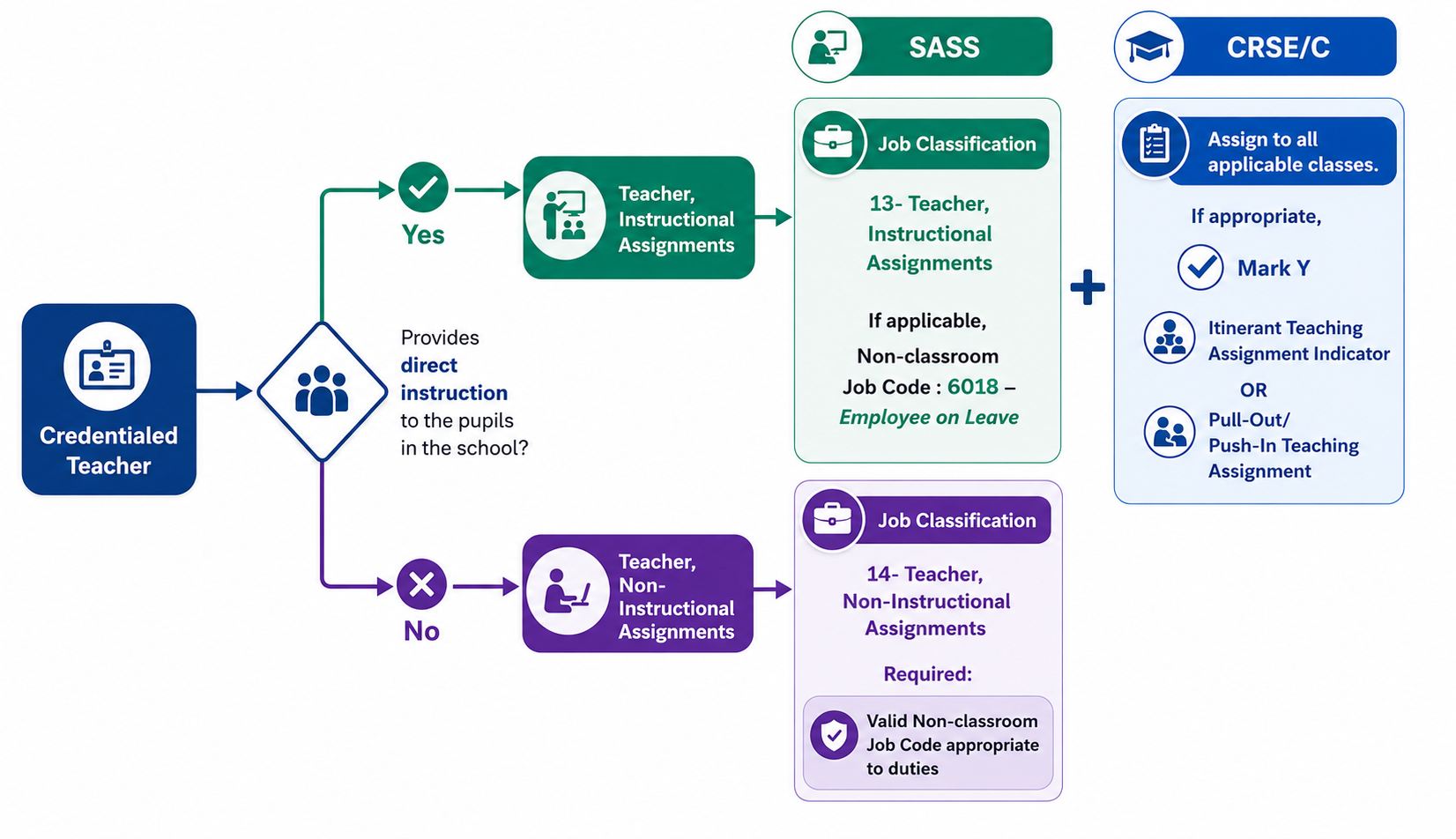
NOTE: A teacher may have both classroom and non-classroom assignments and therefore must be reported with multiple SASS records reflecting both a 13 and 14 plus the appropriate additional applicable data.
Teacher Scenarios
Below are guidelines on how to report teachers based on different teaching scenarios.
| Teaching Scenarios | SASS Job Classification | SASS Non-Classroom Job Assignment | CRSE | CRSE Itinerant Teaching Assignment Indicator | CRSE Pull-Out/Push-In Teaching Assignment Indicator | SCSE |
|---|---|---|---|---|---|---|
| Regular teacher of record | 13 | 6018, if TOR is on leave | Assign SEID and appropriate state course code to course record. | Leave blank | Leave blank | Required |
| Resource Teachers | 13 | — | Choose appropriate support code: • 9230 – Response to Intervention (RTI)/Multi-tiered Systems of Support (MTSS) • 9245 – Foundational Math Support • 9246 – Higher Math Support |
Yes, if the teacher is assigned to multiple schools. | Yes | Student roster optional |
| EL Push-In/Pull-Out Class Teachers | 13 | — | Choose appropriate support code: • 9103 – English Support • 9104 – English Language Development Reporting SCSE records for students may be optional if the students are in classes also flagged as providing EL services. |
Yes, if the teacher is assigned to multiple schools. | Yes | Student roster optional |
| Permanent Employed Substitute Who Is Not Currently Assigned to Any Course Section (Optional) | 14 | 6014 – Day-to-Day Substitute Teacher/Permanent Employee | N/A | — | — | — |
| Pull-Out/Push-In All Other Subjects (Band, P.E.) | 13 | N/A | Assign the appropriate state course code for the class based on the subject matter. | Yes, if the teacher is assigned to multiple schools. | Yes | Student roster optional |
| College Teachers Not Employed by LEA | N/A | N/A | Assign the appropriate state course code and use SEID 9999999999. Beginning Fall 2 of 2020–21, SEID 9999999999 may be used without triggering a misassignment for courses with Field 9.19 – Course Instructional Level Code populated with Code 23 – College Credit Only or Code 24 – Dual Credit. College Credit Course codes: 9020, 9082, 9096, 9120, 9154, 9200, 9227, 9273, 9303, and 9358. |
— | — | — |
| Teachers Not Employed by LEA (Teaching ROPC, Distance Learning, Third Party) | 13, if SEID is available. Othwerwise, N/A | N/A | Assign the appropriate state course code and report a valid SEID for the teacher if available. Otherwise, use SEID 9999999999, which will result in a misassignment. | Yes, if the teacher is assigned to multiple schools. | — | Required |
How to Report Teacher Librarians
Teacher Librarians (school site level)
| Staff Type Description | Description | Credential(s) | SASS Staff Job Classification Code | CRSE (Course Enrollment File): CRS – State Course Code | SCSE |
|---|---|---|---|---|---|
| Teacher Librarian | Manages the library and provides instruction to students as a departmentalized, scheduled class in the library or in a classroom. | Teaching and Library Science and Special Class Authorization | 13 | 9214 | Yes |
| Teacher Librarian (Guided Library Time) | Guided library time provides students with guidance on information and digital literacy and digital citizenship and is typically offered in a pull-out setting in the library. A teacher librarian is available to provide general guidance to students on accessing, evaluating, using, and integrating information and ideas found in print, media, and digital resources effectively. | Teaching and Library Science. Special Class Authorization (Not Required) |
13 | 9238 | Yes |
| Teacher Librarian (Pull-Out) | Manages the library, and students are pulled out of their regular class to receive instruction in the library. | Teaching and Library Science | 13 | 9214 CRSE Pull-Out/Push-In Teaching Assignment Indicator: YES |
Student Roster Optional |
| Teacher Librarian (Push-In) | Manages the library and provides instruction to students in another teacher's classroom. | Teaching and Library Science | 13 | 9214 CRSE Pull-Out/Push-In Teaching Assignment Indicator: YES |
Student Roster Optional |
| Teacher Librarian (Non-Instructional) | Plans and coordinates school library programs with the instructional programs of a school district through collaboration with teachers; selects library materials; and develops and delivers library staff development. These teachers do not provide instruction to students in classroom-based, pull-out, or push-in settings. | Teaching and Library Science | 14 Non-Classroom Based Job Assignment Code: 6027 |
N/A | — |
| Administrator – Library Media Services | Supervises Library Media Staff. | Administrative Services and Library Science | 10 Non-Classroom Based Job Assignment Code: 0137 |
N/A | — |
| Library Supervisor or Assistant (Classified) | Manages or assists in the library. | None | Not reported in CALPADS. Reported in aggregate on the CBEDS School Information Form (SIF) – Classified Staff Count Section. | Not reported in CALPADS. Reported in aggregate on the CBEDS School Information Form (SIF) – Classified Staff Count Section. | — |
Teacher Librarians (District level)
The table that follows provides information regarding how to correctly report Teacher Librarians at a school site level.
| Staff Type | Description | Credential(s) | SASS Job Classification Code | CRSE (Course Enrollment File): CRS – State Course Code | SCSE |
|---|---|---|---|---|---|
| Teacher Librarian (Pull-Out) | Manages the library, and students are pulled out of their regular class to receive instruction in the library. | Teaching and Library Science | 13 | 9214 CRSE Pull-Out/ Push-In Teaching Assignment Indicator: YES | Student Roster Optional |
| Teacher Librarian (Non-Instructional) | Plans and coordinates school library programs with the instructional programs of a school district through collaboration with teachers; selects library materials; and develops and delivers library staff development. These teachers do not provide instruction to students in classroom-based, pull-out, or push-in settings. | Teaching and Library Science | 14 Non-Classroom Based Job Assignment Code: 6027 |
N/A |
How to Report Special Education Assignments
| SPED Assignment Scenarios | SASS Job Classification | SASS Non-Classroom Job Assignment | CRSE | CRSE Itinerant Teaching Assignment Indicator | CRSE Pull-Out/Push-In Teaching Assignment Indicator | SCSE |
|---|---|---|---|---|---|---|
| Regular teacher of record | 13 | 6018, if TOR is on leave | Assign SEID and appropriate state course code to course record. Instructional Strategy Code should be populated with 700 - Special Education |
Leave blank | Leave blank | Required |
| Resource Teachers | 13 | — | 9231 – Special Education Support–Resource Specialist Program (RSP) Instructional Strategy Code should be populated with 700 - Special Education |
Yes, if the teacher is assigned to multiple schools. | Yes | Student roster optional |
| Special Education Case Manager (non-instructional) | 14 | 6029 – Special Education Case Manager (non-instructional) | N/A | — | — | — |
Reporting assignments for staff serving students with disabilities in Special Education
Special day classes should be reported in one of two ways:
- If the teacher is providing instruction in a self-contained setting, then the State Course Code should be 1000 - Self-contained and the Instructional Strategy Code should be populated with 700 - Special Education;
- If the teacher is providing the student's primary a departmentalized setting, then LEAs should select the appropriate State Course Code that aligns with the content that the teacher is teaching. Additionally, the Instructional Strategy Code should be populated with 700 - Special Education;
Special Education Support - Resource Specialist Programs assignments:
If the teacher is providing SUPPORT instruction (supplementary to their primary instruction) in any subject to students with disabilities (pull-out or push-in)
- the teacher should be reported with a Job Classification Code of 13
- the teacher should be reported with State Course Code 9231 - Special Education Support-Resource Specialist Program (RSP) with CRSE/C Field 9.37 Pull-Out/ Push-In Teaching Assignment marked YES.
- the Instructional Strategy Code should be populated with 700 - Special Education.
- LEAs are encouraged, but are not required to submit Student Course Section Enrollment records for students that are receiving the support instruction from this teacher, as long as CRSE/C Field 9.37 Pull-Out/ Push-In Teaching Assignment marked YES.
- RSP Teachers should NOT be reported as "co-teachers" when they are providing pull-out or push-in support for students with disabilities who have been mainstreamed into general education classes.
Staff providing special education services such as occupational and physical therapy or speech and language pathology
- Staff providing special education services (not instruction) should be reported in the Staff Assignment (SASS) File with the appropriate Non-Classroom-Based or Support Assignment Code. Course sections should not be reported for these staff.
REMINDER: Instructional Strategy code 700 should ONLY be used for courses specifically designed for students with disabilities where all students enrolled are students with disabilities
What classes should be reported for Fall 2?
Include all Course Section Enrollment (CRSE) records occurring on Census Day or for school tracks that are not in session on Census Day, the course submission includes the course sections that begin no later than 30 calendar days after Census Day. This is required for all K-12 students. Do not include lunch, before/after school programs, or preschool course sections.
| Courses that must be submitted | Optional courses that can be submitted | Courses that should NOT be submitted |
|---|---|---|
| Academic core and non-core courses | Student Assistant (where students are not receiving grades or credits) |
Lunch Period |
| Special Education | Home Room, Study Hall (where students are not receiving grades or credits) |
Summer School |
| Home Hospital | College | Before/After School Program |
| Distance Learning | — | Free Period |
| Independent Study | — | Preschool |
| — | — | Adult Education |
Reporting 9999999999 SEIDs
SEID 9999999999 MUST ONLY be reported in the Course Section file. Do not submit a SDEM or SASS record with it.
May be used for:
- College professors with no K-12 credentials
- Courses identified as college courses in CALPADS will not generate an exception
- Contracted employees (COE, other districts, ROC/Ps, outside agencies) This will generate an exception, LEAs must provide evidence that educator holds appropriate credential and authorizations in CalSAAS
May NOT be used for:
- Charter school teachers
- Non-credentialed charter teachers must minimally obtain a Certificate of Clearance which will issue them a SEID
Using SEID 9999999999s outside of the college course reporting will almost always generate an exception.
SEID 9999999999 may only be used for the following courses without getting flagged as a mis-assignment:
- CTE Courses (State Course codes 7000 -8999)Courses with Field 9.19 - Course Instructional Level Code populated with:
- Code 23 - College Credit Only, or
-
Code 24 - Dual Credit.
-
College Credit Course codes: 9020, 9082, 9096, 9120, 9154, 9200, 9227, 9273, 9303, and 9358.
Important Note:
Although CALPADS will continue to allow the use of SEID 9999999999s, wherever and whenever possible, and if information is available, LEAs should:
- Use the teacher’s actual SEID
- Submit a Staff Demographic Record for the teacher at the LEA in which they are providing instruction
- Submit a Staff Assignment Record for the teacher at each school in which they are providing instruction
Who are the students you should report with a Student Course enrollment?
You would include all Student Course Enrollment (SCSE) records occurring on Census Day (10/07/2026) or for school tracks that are not in session on Census Day, the student course enrollment submission includes the student course sections that begin no later than 30 calendar days after Census Day. Do not include lunch, free period, or preschool student course sections.
How to pick the correct course codes
Picking appropriate state course codes for each class should involve curriculum staff and should not be the job of the CALPADS data person. The CALPADS Help desk may go as far as point users to resources need to make the appropriate state course code selections. With that said, when picking a state course code:
-
Determine content of the course
-
Which standards were used to develop the course?
-
What are the grade level standards being taught?
-
DO NOT choose the course code based on the teacher’s credential or student grade levels
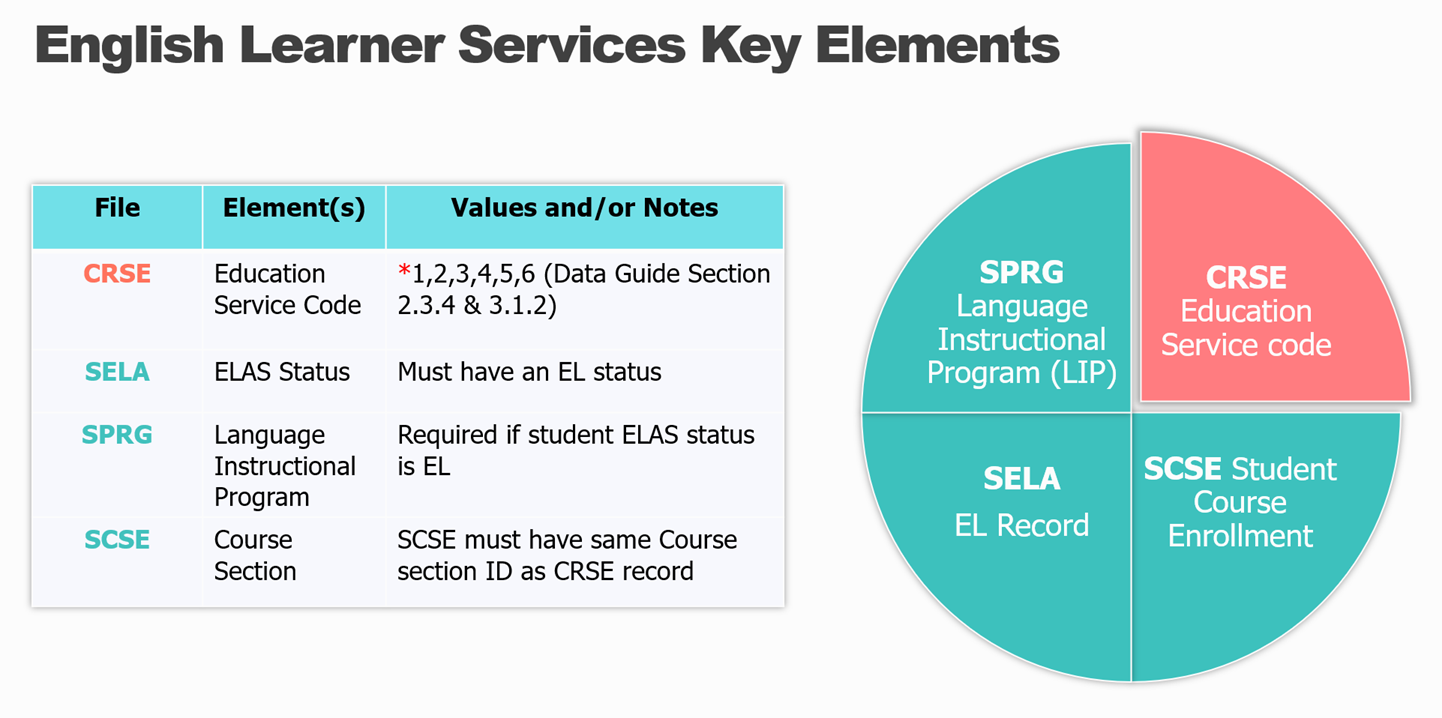
How to Report EL Services
There are four data elements that comprise the full English Services information of each English Learner.
What is the Postsecondary Status (PSTS) File?
The Postsecondary Status (PSTS) file will be used by LEAs to submit post-secondary status data for:
- CTE Pathway Completers as required by Perkins V as part of Fall 2
- Students with Disabilities (SWD) as required by the Individuals with Disabilities Education Act (IDEA) as part of End-of-Year 4
Since the PSTS file will be used for two purposes, not all of the fields on the PSTS file are required for the Fall 2 PSTS CTE submission.
You may review the PSTS page for more details.
Assignment Monitoring Resources
The following resources provide additional information regarding assignment monitoring compliance requirements and procedures.
2022-23 Assignment Monitoring Training Video
This is a recording of the onsite Assignment Monitoring training that CDE provided for Fresno Count Office of Education.
Appropriate Credentials for CALPADS Course Codes
This site is intended to support credential analysts in determining which authorizations are required to teach in course assignments.
Appropriate Credentials for Special Education Categories
This page is intended to support credential analysts in determining which authorizations align with Special Education disability categories. Note, the table includes only currently issued documents.
Appropriate Credentials for English Learner Services
This page is intended to support credential analysts in determining which English Learner authorizations are required to provide the various types of English Learner Services.
Appropriate Credentials for Non Classroom Based Assignments
This page is intended to support credential analysts in determining which English Learner authorizations are required to provide the various types of English Learner Services.
2021 Assignment Monitoring Training Powerpoint
This is the CALPADS Fall-2 Assignment Monitoring PowerPoint presentation for winter 2021 training sessions.
Assignment Resources
Helpful resources related to assignment monitoring compliance.
CALSAAS Training
Provides detailed training on the CALSAAS process.
Recorded Webinars
California Department of Education (CDE) and Commission on Teacher Credentialing (CTC) staff developed recorded webinars about changes in course codes and the California Longitudinal Pupil Achievement Data System (CALPADS), California State Assignment Accountability System (CalSAAS), and the Promoting Equitable Access to Teachers (PEAT) program.
PEAT Video Series
Video topics for the Promoting Equitable Access to Teachers (PEAT) Program by the California Department of Education.
Promoting Equitable Access to Teachers Resource
Resources to assist local educational agencies (LEAs) with gathering data and reporting disproportionate access to effective, experienced, and appropriately assigned teachers by low-income and minority students as required under the ESSA.
Contacts
- CALPADS: Click Here
- CalSAAS: Contact your monitoring authority
- Educator Equity: TLPO@cde.ca.gov
Fall 2 Training Resources
CSIS YouTube Channel
Includes self-paced training presentations, weekly Q & A recordings as well as recordings of other CALPADS related events.
CSIS Training Registration
Register for live training classes.
CSIS Training Resource
Stores valuable data management tools and downloadable training Powerpoint presentations.
CDE CALPADS Page
The CA Department of Education's portal to all CALPADS resources, department communications, and access to other education-related agencies.
CALPADS System Documents
The following documents provide additional information regarding the operation and data submission requirements in relation to Fall 2.
CALPADS File Specifications
This document provides detailed information about the input files that are used to batch load data into CALPADS.
CALPADS File SpecificationsForm
This spreadsheet provides detailed information about the input file requirements that are used to batch load data into CALPADS.
CALPADS Error List
This document contains descriptions for each error generated when submitting data to CALPADS. It also provide suggested resolutions.
CALPADS Data Guide
The CALPADS Data Guide provides information for LEAs regarding the data to be submitted to CALPADS. Information in the guide includes guidelines regarding how LEAs should prepare for each submission, as well as information regarding how given data are used.
CALPADS Code Sets
This document contains the current code values referenced in the file specifications for the coded value data elements. CALPADS course codes (formerly CBEDS course codes) are included in this document (see the "Course Group State" code set).
CALPADS Valid Code Combinations
This document lists codes that can only be used in specific combinations in CALPADS.
Where to get Support
For curriculum course mapping questions in relation to Assignment Monitoring contact the Teacher and Leader Policy Office: TLPO@cde.ca.gov
CALPADS Support
- Web Form: Click Here
- Email: calpads-support@cde.ca.gov
- Voicemail for CALPADS Support: (916) 325-9210
FCMAT/CSIS Services
- FCMAT/CSIS Online Support Form Click Here
- Email: support@fcmat.org
- Voicemail for FCMAT/CSIS Support: (916) 325-9210