Report 16.23: Students with Disabilities – Special Education Status and Non-Participation Reason Student List
(Updated 5/01/2026)
Description: Reports list of students enrolled during the report period and their Special Education Status and Non-Participation Reason
Report Type: Snapshot / Certification (EOY)
Security Roles SPED View
Data As Of:
- Snapshot EOY: July 1 – June 30 of reporting year
Basic selection criteria:
-
Students Included: Students with a qualifying enrollment who have an associated qualifying Special Education Status Record (SWDS) at any time during the report period.
-
Qualifying Enrollment:
- Most recent Open Enrollment within an LEA at any time during the Report Period. N470 enrollments included.
- Enrollment Status Code = Primary (10), Short-term (30), or Non-ADA (50)
- Default Grade Level = IN, PS, TK-12
-
Qualifying Special Education Records:
- Most recent Special Education Status Record (SWDS), regardless of LEA, effective during qualifying enrollment and effective during the Report Period (7/1 – 6/30)
-
If most recent SWDS Status = Eligible and Not Participating (2), Eligible and Not Enrolled (3), Not Eligible (4), the Status Start Date (SWDS Field 22.11) must be within: 5/15/Previous Year and 6/30/Current Year.
-
If most recent SWDS Status = Eligible and Participating (1), the Status Start Date (SWDS Field 22.11) can be before the current academic year, but it must be the most recent status effective.
Report Filters: Filters can be selected resulting in only totals for the selected filter being displayed – legend on bottom of last page of report states which filter/s were selected
- Academic Year
- LEA
- Status
- Gender
- Ethnicity/Race
- Grade Level
- English Language Acquisition Status
- Socio-economically Disadvantaged
- Title I Part C Migrant
- Homeless Program Eligible
- Foster Youth
- Student Age – Defaults to 0 – 22 years. Calculation: 6/30/academic year minus Birth Date from the most recent SINF overlapping qualifying enrollment.
Report Logic
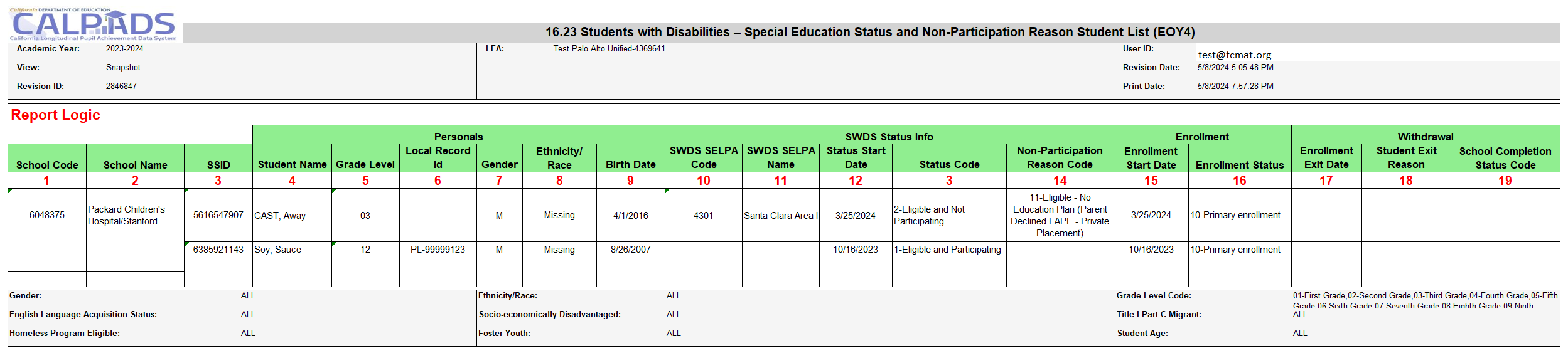
| # | Column | Description |
|---|---|---|
| 1 | SENR Field 1.05 | School of Attendance |
| 2 | School Name | Data element name from CALPADS Security Model for School Code on SENR Record |
| 3 | SENR Field 1.08 | SSID |
| 4 | SENR Fields 1.10–1.12 | Student First, Middle, and Last Name |
| 5 | SENR Field 1.24 | Grade Level Code |
| 6 | SWDS Field 22.03 | Local Record ID |
| 7 | SINF Field 2.19 | Gender |
| 8 | Ethnicity/Race | Identified using SINF fields 2.24 (Student Hispanic Ethnicity Indicator), 2.25 (Student Ethnicity Missing Indicator), 2.26–2.30 (Student Race 1–5 Code), and 2.31 (Student Race Missing Indicator) per the following rules: 1. If Field 2.24 = Y, always roll up to Hispanic, even if one or more races are selected or Field 2.31 = Y 2. If Field 2.25 = Y, roll up to Missing, even if one or more races are selected or Field 2.31 = Y 3. If Field 2.24 = N and Field 2.31 = Y, roll up to Missing 4. If Field 2.24 = N and Field 2.31 = N: • Single race = 100 → American Indian or Alaska Native • One or more Asian subgroups (201–208, 299, 400) and no other race category (100, 301–304, 399, 600, 700) → Asian • One or more Hawaiian/Pacific Islander subgroups (301–304, 399) and no other race category (100, 201–208, 299, 400, 600, 700) → Hawaiian/Pacific Islander • Single race = 600 → Black or African American • Single race = 700 → White • More than one of the above race categories → Multiple |
| 9 | SINF Field 2.18 | Birth Date |
| 10 | SWDS Field 22.09 | Reporting SELPA — from SWDS record where Status Code ≠ Eligible and Participating (1) |
| 11 | SELPA Name | Data element name from CALPADS Security Model — from SWDS record where Status Code ≠ Eligible and Participating (1) |
| 12 | SWDS Field 22.11 | Special Education Status Effective Start Date |
| 13 | SWDS Field 22.12 | Special Education Status Code |
| 14 | SWDS Field 22.13 | Non-Participation Reason Code |
| 15 | SENR Field 1.22 | Enrollment Start Date |
| 16 | SENR Field 1.23 | Enrollment Status Code |
| 17 | SENR Field 1.25 | Enrollment Exit Date |
| 18 | SENR Field 1.26 | Student Exit Reason Code |
| 19 | SENR Field 1.27 | Student School Completion Status |
Additional Resources
CALPADS File SpecificationsForm
Look for Special Education (SPED) tab for the fields indicated in the report logic.
CALPADS Data Guide
Provides additional information on Special Education adn Student Services.
CALPADS Code Sets
This document contains the current code values referenced in the file specifications for the coded value data elements. The code definitions are listed in this document.